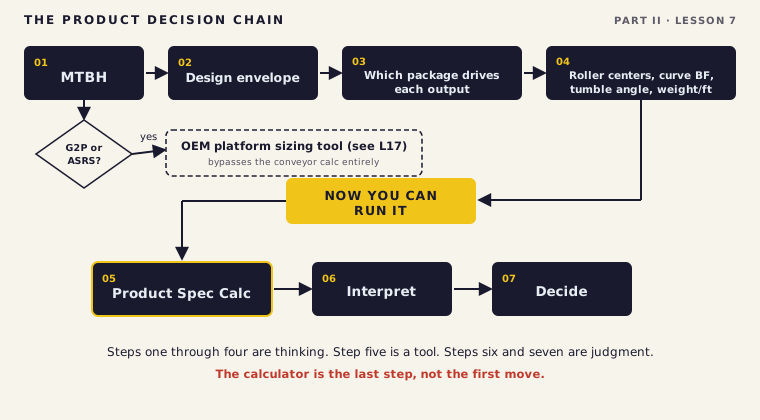
There's an engineer on every team who reaches for the calculator the second the product data lands. Spreadsheet open, numbers pasted, outputs in a minute flat. It looks like competence. It isn't. Someone who can run the calculator but can't tell you what the outputs mean hasn't learned product analysis. They've learned data entry.
The Product Spec Calc is a translation layer. On one side is what the customer handles: cartons of a hundred shapes and weights. On the other is what your design has to deliver, a belt width, roller centers, a curve, an incline limit. The calc turns one into the other, fast and without arithmetic slips. But it only translates what you feed it, and it can't tell you whether what you fed it was the right thing to ask.
Open it first, paste in the raw spreadsheet, and it'll happily size the whole system around a carton that's two percent of the volume. The number will be right and the design will be wrong, and you won't find out until it's built. The chain in this lesson exists for one reason: so the calculator is the last step, not the first move.
By the end of this lesson you should be able to run the decision chain in order, from MTBH to envelope to which package drives each output to roller centers, and only then open the Product Spec Calc, read what it gives you back with judgment instead of trust, and know when the whole conveyor calculation stops applying and an OEM platform tool takes over.
Every product analysis answers one question in the end: can this product be conveyed, and if so, on what? You don't answer it by guessing and you don't answer it by opening a calculator. You answer it by walking a fixed sequence, and the sequence is the whole skill. Here's the order.
Four steps of thinking, one tool, then two more steps of judgment. The tool sits in the middle for a reason, and the order isn't a suggestion. Run it out of order and you'll get answers that pass their own checks and are still wrong.
Say you've done the thinking. MTBH's in hand, envelope's set, you know which package should drive each output. Now the calc. The Inputs and Outputs tab produces a handful of package-basics outputs, and the Calculation Logic Guide is the companion on every formula behind them. You don't memorize the formulas. You learn what each output tells you and which carton should produce it.
Weight per foot. Carton weight divided by carton length in feet. It's a per-carton number, and the worst case is the heaviest carton at its shortest length, not the average. Surface it here and read it. What you don't do in this lesson is make the motor-driven-roller call from it. The weight-per-foot and weight-per-zone checks that can rule out MDR belong to Lessons 12 and 13. Here you produce the number and hand it forward.
Minimum curve between-frame width. Pythagoras applied to the worst-case carton position in a curve, where the corner has to clear the outside rail. You run it against every carton in the mix, and the largest result sets the curve width. One outlier carton can force a much wider curve than the rest of the mix needs. Round up to the next catalog width, never down.
Tumble angle. The maximum incline before a carton tips forward, modeled as it tipping when its center of gravity passes its front bottom edge. Every carton has its own, and you design inclines to the minimum in the mix, the worst case, with margin. The calc gives you the theoretical limit. The actual decline design, on a real angle off a real mezzanine, is Lesson 14. Here you read the limit and flag anything tippy. And tumble is only half of what height drives: the same carton height sets the vertical clearance at scan tunnels and any equipment the carton passes through, and it can rule out certain sorter configurations, so a tall carton is a clearance problem as much as a tip problem.
Roller centers. The dimension running in the direction of travel, L, divided by three, so a minimum of three rollers is always under the package. It's the plainest output on the tab and the one people trust without looking. Don't.
Before you trust the roller-center number, picture the minimum package turned hard-way, its long edge leading, dropping toward the gap between two rollers. That teeter is exactly what the three-roller rule is there to stop. The number is just that picture written as arithmetic.
Notice the discipline running through all four. The calc gives you parameters; judgment draws the line. It'll hand you a curve width to the hundredth of an inch off a carton you might not even want in the system. Rate and gap live on this same tab too, but those wait for Lesson 10, when you size the system to a rate. Today the job is the package geometry, not the flow.
If you're about to size a system off the calc, then run the package-basics tab for at least three scenarios, the most common package, the smallest, and the largest, not just one. Tradeoff: three runs instead of one, a few extra minutes. Verify: if the three produce consistent outputs, you've got a clean design. If they conflict, you've got a product-mix problem to resolve before you design, not a surprise to discover after it's installed.
Treating the calculator output as the decision. The calc produces numbers. It can't tell you whether the max carton that's driving your belt width belongs in the system at all. That's a volume question and a customer conversation, not a cell in a spreadsheet. Run the number, then do the thinking the number can't do for you.
Every output on that tab traces back to one package. Roller centers and the smallest gap come from the minimum. Belt width and curve geometry come from the maximum. Speed and throughput come from the average package. Read each output against the package that should have produced it. A curve width driven by your average carton is a red flag: it means your max carton isn't as far out as you thought, or you fed the calc the wrong number.
When outputs conflict, you don't average them. Averaging is how you design a system that fits nothing. A curve wide enough for the large case and roller centers tight enough for the small case can both be right at once, because different packages drive them. What you do is analyze the volume behind each extreme and decide the envelope. If the carton forcing a wider, costlier curve is six percent of the volume, that's a conversation with the customer about whether it belongs inside the envelope or on an exception path. You make a recommendation; you don't make the decision for them.
And you run it again whenever the product profile changes materially. The outputs are only ever as valid as the inputs that made them. A new client, a new SKU, a packaging change on the dominant carton, any of those and the old numbers are stale. The calc is fast on purpose, so rerunning it costs you nothing.
There's a limit to where this calc is the authority. The Product Spec Calc is the starting point for any system where packages move on conventional conveyor. For specialized platforms it stops being the authority, and knowing where that line sits matters as much as running the calc. Goods-to-person systems like AutoStore, Kardex, Hanel, and SSI Schaefer come with their own sizing tools. So do automated storage and retrieval systems. Those tools are built around tote dimensions, throughput, port and grid layout, and cycle time, not the conveyor math you just learned. Sorter throughput calculators work alongside the conveyor calc, not instead of it. The rule is plain: identify the platform early, get the manufacturer's tool, and never substitute a general calculator for a manufacturer-specific one. How those platforms work, and when they beat conveyor, is Lesson 17.
Here's the thing about any calculator I've ever built. A student who understands why the formula works will catch a bad input every time. A student who just types numbers in and trusts what comes out will not. The calc isn't there to think for you. It's there to do the arithmetic fast so you can spend your judgment on the part that actually matters, which is deciding what should have gone into it in the first place.

Someone hands you a filled-out Product Spec Calc for a project you've never seen and says the numbers check out. What's the first question you ask before you trust a single output on that sheet?
Back to Riverside. Dana's team sent over the WMS product report: four products, four rows. Before you touch the calc, the project hands you the same discipline this whole lesson is about.
You have four products in front of you. Before you open the Product Spec Calc, answer these questions in writing. Which product is the system going to see most of the time? What does that tell you about what the design needs to be optimized for? Look at the volume percentages. Do any products stand out? What questions do those numbers raise? Which product concerns you most on a decline conveyor coming off the second floor mezzanine? Why? Answer these questions before you open the calculator. Your answers will tell you whether you are ready to use the calculator or whether you are using it to avoid thinking.
| Product | Length | Width | Height | Weight | % Volume | Product Use |
|---|---|---|---|---|---|---|
| Small Case | 8" | 6" | 4" | 3 lbs | 4% | Packaged food |
| Standard Case | 13" | 9" | 3" | 12 lbs | 78% | All clients |
| Tall Case | 10" | 8" | 14" | 18 lbs | 12% | Apparel client |
| Large Case | 22" | 15" | 7" | 28 lbs | 6% | Housewares |
Walk the chain with the calc closed. The Standard Case, 13 by 9 by 3 at 78 percent of volume, is the design driver, and the system gets optimized for it. The Small Case, 8 by 6 by 4, is the minimum, and it drives roller centers and the smallest gap. The Large Case, 22 by 15 by 7, is the maximum, and it drives belt width and curve between-frame width; at 6 percent it's a candidate for the exception-path conversation. The Tall Case, 10 by 8 by 14 at 12 percent, is the tippy one. You flag it for the mezzanine decline through its tumble angle, but you don't design that decline here. That's Lesson 14. Only after all of that reasoning is on paper do you open the Product Spec Calc, and every output that comes back should match a package you already named. If one doesn't, you've found the problem before it found you.
In your Riverside note, write down which package drives roller centers, which drives belt width, and which you'd flag for the decline, before you open the calc. Then open it and check your answers against the outputs. Note anything that surprised you.
Seven lessons in, and this is the one that puts the tool in its place. Every calculator in the rest of this program, rate, gap, sorter speed, transfer timing, sits inside a chain exactly like this one. The calculator is never the first move and never the last word. It's the fast arithmetic in the middle, bracketed by the analysis that decides what to ask it and the judgment that decides what its answer means. Learn to run the chain in order on four Riverside cartons and you've learned how to run every calculator you'll touch: the thinking comes first, the tool comes fifth, and the decision stays yours.